Top AI Blog Generators to Streamline Your Content in 2025
 George Field
Table of Contents
Introduction
Now, if you are here you are likely not living under a rock and are actuality aware that AI has changed the game in the world of SEO marketing and blog content generation. From keyword optimisation to crafting engaging content, AI tools are now indispensable in the digital marketing landscape and its essential that you utilise them to ensure that your company and website maintain their ability to stay top of both Google search results and AI search.
In this article we are going to go over probably one of, if not, the most Indispensable creation that has come out of this surge in AI tools for SEO marketing and that is AI blog generators.
These tools, as we will see in this article, are enabling incredible results for clients who use them. As a result, we thought it would be best to share, our of corse slightly biased view, with what we do here at seio a, so that you can see how you can leverage these tools to generate blog content that ranks.
Let’s dive into how AI blog generators can revolutionise your content creation process, boost engagement, and help your website rank higher in the search engine results page (SERP).
What is an AI blog generator and how does it work?
An AI blog generator is a blanket term that basically means an AI tool that helps you generate high quality blog content that you can then use for SEO purposes or to post elsewhere. These tools often range from planning content, link building, content formatting and content optimisation to actually writing the article itself.
These tools tend to work in a variety of ways depending upon the tool used. For example, some will get you to create a content plan and then turn that plan into a short article for you to edit further while others will give you the full blown article out of the box.
In essence though they all work in similar ways by doing some initial research and then stitching together various bits of generated content that will form a blog. Some will add images, user content ect to make the blogs posts more authentic and better while some can take your entire sites blog and then train on it to write for you.
So now you are probably thinking that surely the latter of the blog generators would be the best right? well, wrong, it depends on what you are trying to achieve, what you need the content for and how good you need the AI generated content to be.
Just like with ChatGPT and all AI models that are out there, blog generation content is pricy depending on how good you need the content to be. Well established companies in the SEO space are not necessarily the best option due to higher prices charged, especially when you are starting out.
Finding the Right AI Blog Generator for Your Needs
Choosing the right AI blog generator depends on your specific needs and objectives. If you need high-quality, refined content and have the time to edit and tailor the output, a tool that generates a detailed draft might be ideal. On the other hand, if you need content quickly and have less concern for stylistic nuances, an AI tool that can deliver a complete article instantly might be more suitable.
It’s crucial to evaluate the AI tool’s effectiveness in terms of SEO optimisation, tone consistency, and relevancy. Remember, the ultimate goal is to engage your readers while boosting your website’s visibility on search engine results.
Ten Best AI Blog Generators
Okay, now we have finished waffling on about some important yet boring areas, lets take a look at the options you have, what they are good for a bit of info on each one. The Seio team has spent more time than we care to admit experimenting with various AI tools for crafting SEO optimised blog content, saving you the hassle.
So first up we have….
1)SEMrush
SEMRush is the goliath of SEO, the OG, the top dog and with that comes, to be fair, a pretty decent offering in the content writing space.
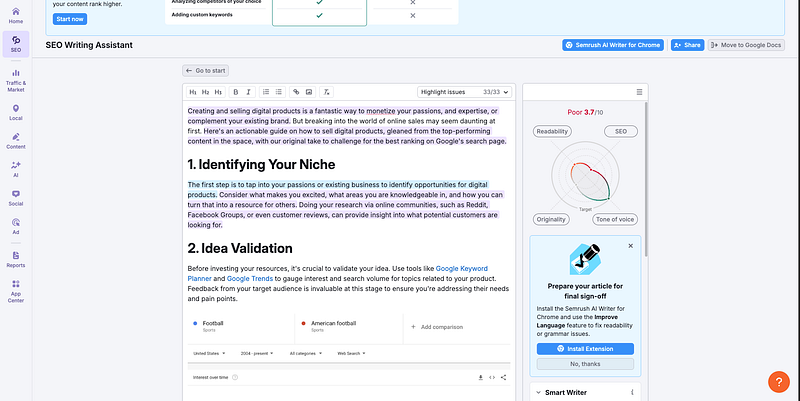
It is also, by far, one of the most expensive SEO tools already and when you combine it with its AI writing features, you are looking at the best part of**$200**per month for just one user.
It does however offer some really cool benefits. The most obvious one is the data that powers it is solid. SemRush’s powerful dataset drives its exceptional performance. With comprehensive keyword analytics, content templates, and SEO writing assistant, it can provide valuable insights to help you craft content that ranks well on search engines. However, it’s worth considering the cost-effectiveness, especially for smaller businesses or startups.
While it will get you ranked, you still have to do the research and take the time to effectively use it and you have to sink massive amounts of money into it to get started.
Also consider that content writing is not SEMrush’s main gig. Keep in mind that SEMrush primarily focuses on SEO, and while its content generation feature is commendable, and still good, it may not be as advanced or tailored as those offered by companies specialising in AI content generation. Thus, for those who want a more cost-effective and specialised solution, other AI blog generators may be worth exploring.
Its size can also be its downfall as smaller SEO content generation companies churn out new features faster and iterate on user feedback at a quicker rate.
SEMrush does also does not offer any useful content integrations so you can’t easily turn articles into social media posts for example.
✅ When to Use SEMrush:
- You require in-depth SEO analytics and are willing to invest for the same.
- You need a tool that provides comprehensive keyword research capabilities to optimize your content.
- Your focus is on creating SEO-driven content and you value the insights from SEO writing assistant.
- You are a large business or an enterprise that can afford the pricing and can effectively utilize the wealth of data SEMrush offers.
- You want to monitor and outperform your competitors in terms of SEO. SEMrush’s competitive analysis features are quite robust.
- You’re not in a rush for new features and prefer a tool that is tried, tested, and reliable.
🚫 When to Look Elsewhere:
- You needcost-effective, plug-and-play AI content tools
- You want fast, re-purposable content across multiple formats (e.g. social posts, newsletters)
- You’re a solo creator, startup, or content-heavy business on a budget
📊 SEMrush at a Glance
Pricing: Starts at$189/month(one user, includes SEO + content tools)
- Main Focus: SEO platform (content generation is a secondary feature)
- AI Writing Tools: SEO Content Template, SEO Writing Assistant
- Data Quality: ⭐⭐⭐⭐⭐ — Backed by SEMrush’s industry-leading keyword database
- Ease of Use: Medium — powerful but requires manual research & learning curve
- Integrations: ❌ Minimal — no easy export to social, CMS, or repurposing platforms
- Content Quality: Strong, articles tend to be shorter though; less creative or brand-specific
- Best For: Agencies or SEO pros who already use SEMrush
- Drawbacks: High cost, slower to innovate, not a dedicated AI content tool
2) RightBlogger (Video-to-Blog Tool)
Rightblogger is a tool that provides a lot of really useful functionality to get you started. They got famous for providing the ability to turn video into blogs, resulting in them becoming popular amongst the YouTube community. They also boast a really useful and powerful blog generator that allows them to create blogs on mass.
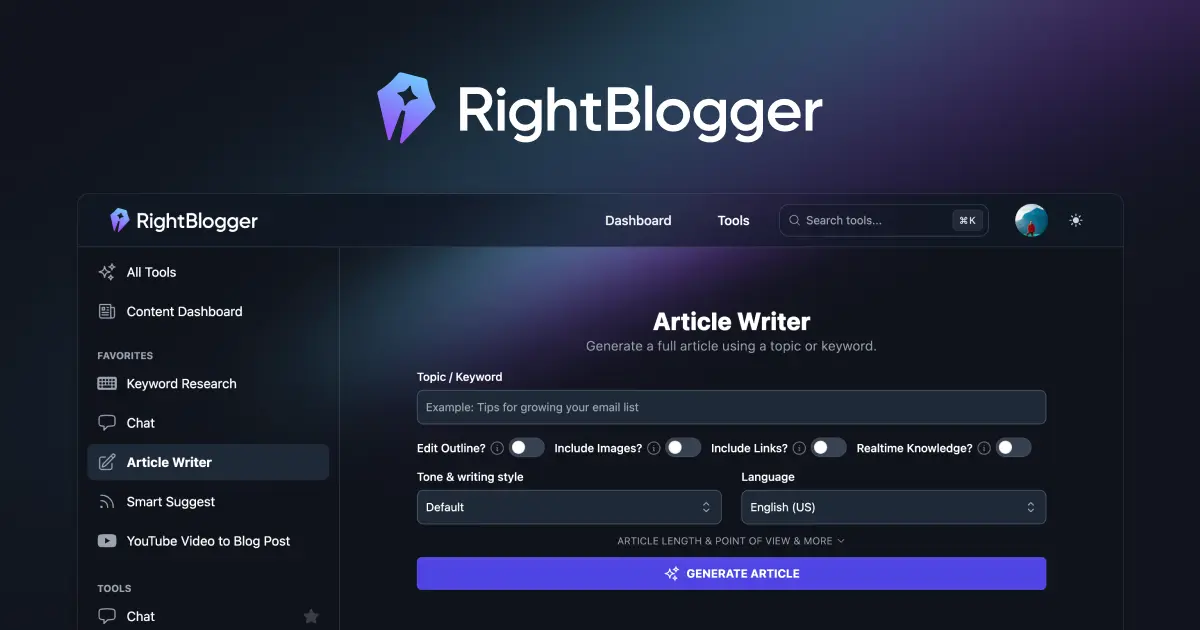
Where they differ to Seio and other products its that they focus more on control of the article generation process. This makes them great if you already have a well mapped out content plan and you just need a tool to finish the job for you.
When testing Right Blogger we found that there content was quite good, however there was still the usual AI waffle inside them but, on the whole, they are a decent option for you if that something that you need. They are better suited to small content teams who have a clear plan on what they need to deliver and are simply trying to automate that part of the blog generation process.
We also found that they are a great option for those who are trying to automate there content creation process. They do provide an excellent tool for converting video into blog posts.
Let’s get one thing straight — it’s not going to write perfect blog posts for you. You’ll still need to guide the structure, add your own insight, and do the actual SEO legwork. But if you’re looking for an affordable, all-in-one writing assistant, RightBlogger gets a lot right.
Unlike bulkier platforms like Jasper or SEMrush (which bolt AI onto a bloated ecosystem), RightBlogger focuses purely on what content creators need: tools to generate, expand, and refine content across blogs, social media, and sales pages — without upsells or word count limits.
It’s particularly strong if:
- You already know your niche and have a structured content plan
- You create content across formats (blog > video > social) and want to repurpose with minimal friction
Where it falls short (until recently) was with integrations — something Koala and FABB did better via direct WordPress export. But as of 2025, RightBlogger now includes native WordPress integration and a Chrome extension, making it far easier to slot into your workflow.
✅ When to Use RightBlogger:
- You’re a solo blogger or small team looking for an unlimited-use tool
- You want to map and execute SEO clusters quickly
- You need tools beyond blogs — like bios, email subject lines, or Instagram captions
- You repurpose a lot of YouTube content and want fast blog drafts
🚫 When to Look Elsewhere:
- You need long-form, SEO-researched content with zero editing required
- You want deep keyword data (you’ll still need something like Keysearch alongside this)
- You’re looking for content that mimics expert-level writing out-of-the-box
3) Seio
Of course we were always going to shout out our own product here but we are providing a fair review of these products and, our product is perfect for a lot of readers so without further ado, lets let our self promotion take over your attention span for a couple of minuets.
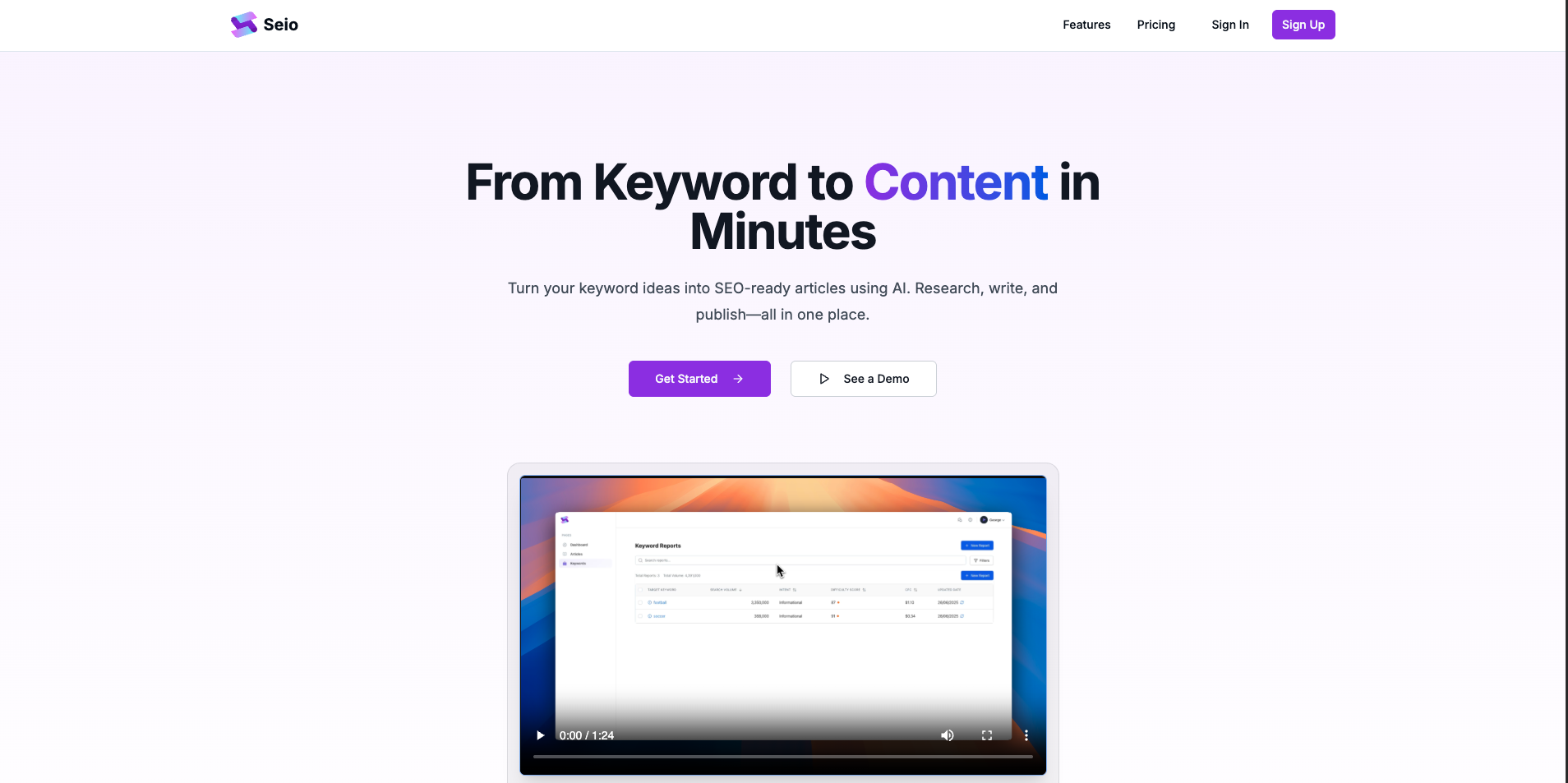
Seio is a blog content generation tool that aims to generate content as efficiently and as quickly as possible from keywords. Behind the scenes our AI generates the whole article for you based on what it analyses as the best chance of creating content that gets ranked.
Seio also boasts a cost effective keyword research tool that provides high quality, accurate search data that allows you to create articles straight from what you discover. Seio’s primary focus is on content generation, which gives it an edge over tools that offer it as a secondary feature. It uses AI to churn out professionally written, SEO-optimized articles in a matter of minutes. This can save you valuable time and resources, especially if you’re a startup or a solo creator.
The best thing about Seio though, is that unlike other tools, it focuses on SEO article content, that is it! The team at Seio are passionate about creating a platform that is driven and tailored to that specific use case.
It doesn’t try to be an all-in-one marketing platform. It doesn’t do social posts, email sequences, or sales pages. What it does offer is a streamlined pipeline that turns keyword research into articles in just a few clicks — and it’s fast.
The core value prop is simple:
- Plug in your keyword
- Get SEO insights and search data
- Hit generate
- Refine it with Seio’s AI-powered editor (which feels more like collaborative editing than starting from scratch)
Unlike other tools that treat blog content as a secondary feature, Seio is built around it. The team behind it is focused purely on ranking articles and have stripped away distractions to create a tool that’s purpose-built for SEO content creators.
Where it really shines is speed + SEO intent alignment. It’s not going to give you the most creative or voice-driven copy — but it will help you go from keyword to draft with minimal friction, making it a great fit for content pipelines that rely on volume and consistency.
✅ When to Use Seio:
- You’re trying to rank blog posts quickly and consistently
- You want a tool focused purely on blog content (not repurposing)
- You already know your target keywords and want to speed up production
- You’re a solo founder or small team needing fast output without bloat
🚫 When to Look Elsewhere:
- You need advanced SEO features (e.g., competitor tracking, SERP monitoring)
- You want an all-in-one tool with social or sales copy features
- You’re looking for brand-heavy, long-form editorial-style writing
📊 Seio at a Glance
- Pricing: Affordable with different packages available for varying needs
- Main Focus: AI-powered blog content generation
- AI Writing Tools: SEO Content Generator
- Data Quality: Strong, backed by accurate search data
- Ease of Use: User-friendly and intuitive
- Integrations: Easily integrates with your existing systems
- Content Quality: High-quality, SEO-optimized, professional articles
- Best For: Startups, solo creators, and anyone needing efficient content
- Drawbacks: Does not offer a comprehensive SEO suite, primarily focused on content generation.
4) Writesonic
Writesonic is often lumped in with other “generalist” AI tools, but at its core, it’s actually a serious AI content engine geared toward SEO performance.
It’s designed for teams and solo creators who want to produce long-form content — fast — and with SEO baked into the workflow, thanks to a clean integration with SurferSEO. You can research a keyword, generate an article, and optimize it directly inside their editor. And while it has tools for ad copy, product descriptions, and email subject lines, the real strength is in structured SEO blog content.
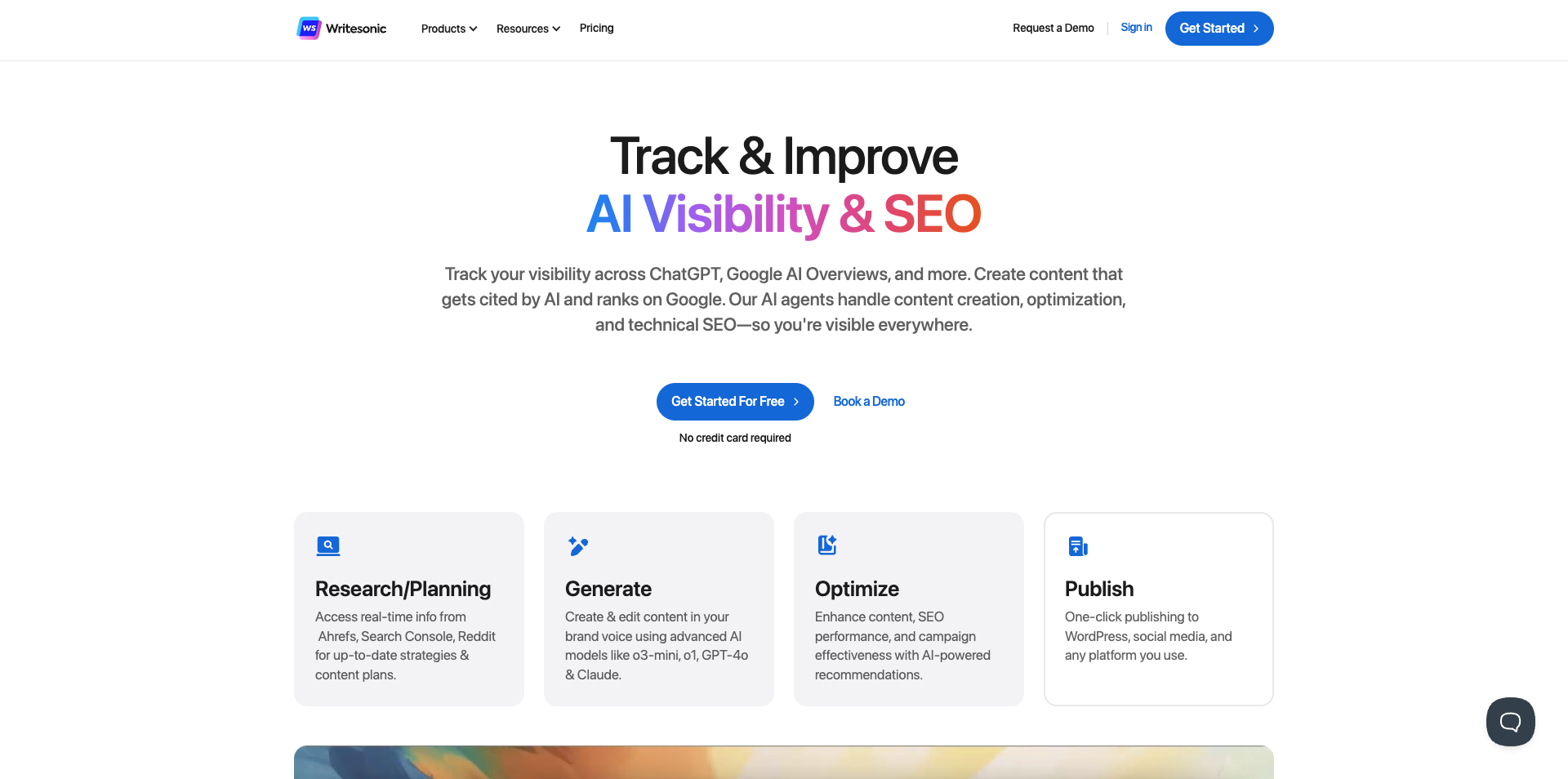
Where it falls short is pricing. The $20/month starter plan only includes 5 articles, which makes it hard to recommend for bloggers who need volume. In contrast, tools like Seio or RightBlogger give you unlimited usage at a lower price point. So while Writesonic’s outputs are generally solid (especially when using GPT-4), it’s tough to justify unless you upgrade to the Pro plan — and even then, you’ll be managing word quotas.
That said, the quality is good, and the editor feels like it was built with content teams in mind. For agencies or businesses already using SurferSEO, it’s one of the more complete AI writing solutions available.
When testing, we did really like it and felt it was a great tool that offers a lot of what a team would need. Pricing is reasonable and you can get a team plan from $249
which includes one extra user. We would defiantly consider Writesonic and its array f products if we were a large team.
✅ When to Use Writesonic:
- You want to generate SEO-focused long-form content with SurferSEO baked in
- You’re producing structured content at scale and want to streamline optimization
- You already use GPT-4 and want a more guided UI/editor workflow
- You need additional tools like Chatsonic or Botsonic, but SEO is your priority
🚫 When to Look Elsewhere:
- You need unlimited article generation at a lower price point
- You’re only publishing 3–5 blogs per month and don’t want to overpay
- You’re building a lightweight personal blog and don’t need advanced SEO tooling
📊 Writesonic at a Glance
- Pricing: Starts at $20/month for 5 articles (GPT-4 plan is metered by word count)
- Main Focus: AI-powered blog and SEO content
- AI Writing Tools: Long-form blog writer, rewriter, content expander, SEO outline generator
- Bonus Tools: Chatsonic (AI assistant), Botsonic (chatbot builder)
- SEO Features: SurferSEO integration, keyword scoring, NLP coverage tools
- Ease of Use: Fast, structured, and intuitive — built for high-output teams
- Best For: SEO content creators, agencies, Surfer users, and GPT-4 power users
- Drawbacks: Entry plan is restrictive, GPT-4 usage drains word quota quickly
5) MarketMuse
MarketMuse positions itself as a content intelligence platform built for strategists who want to take the guesswork out of SEO. If Seio is about fast execution and RightBlogger is about AI-assisted writing at scale, MarketMuse is what you’d use to build the content plan behind it all.**
The platform uses AI to analyze your existing site, benchmark it against competitors, and show you where the gaps are — not just by keyword, but by topic depth, coverage, and authority. When using it, we found that Its content briefs are detailed, its topic modeling is precise, and the platform is clearly designed for content teams that care about ranking with quality, not just quantity.

The depth and breath of the reporting coupled with the content brief design on offer is acutely REALLY good and they clearly have great data sources to create these ideas. Its the perfect product for new teams that are trying to uncover content improvements for their site and analyse where they can improve, especially if the team is experienced.
If you’re publishing dozens of pieces per month and want to make sure you’re building topical authority in your niche — this is the tool that shows you where you stand and how to win. But it’s overkill if all you want is quick drafts, keyword suggestions or to actually create some content.
✅ When to Use MarketMuse:
- You’re building a comprehensive, long-term SEO content strategy
- You want AI-generated content briefs, outlines, and scoring
- You need topic clusters, content gap analysis, and competitive insights
- You’re working with a team of experienced SEO writers or editors and want consistency and structure
🚫 When to Look Elsewhere:
- You’re a solo creator or startup on a tight budget
- You’re looking for an AI writing assistant, not a planning tool
- You just want to generate blog posts quickly without strategy work
📊 MarketMuse at a Glance
- Pricing: High — tailored more toward businesses and agencies
- Main Focus: SEO content planning, optimization, and topic modeling
- AI Tools: Content briefs, competitive analysis, topic clusters, quality scoring
- SEO Features: Deep content audit, SERP modeling, internal linking suggestions
- Ease of Use: Powerful but requires onboarding to fully unlock
- Best For: Agencies, publishers, and SEO teams building data-driven content
- Drawbacks: Expensive, steep learning curve, not ideal for quick-turn content
6) Surfer SEO
Surfer SEO sits somewhere between a traditional on-page optimization tool and a modern AI content assistant — and it does both surprisingly well. Rather than generate content from scratch like Seio or Writesonic, Surfer focuses on what content should look like if you want it to rank, then gives you real-time guidance as you write.
What sets it apart is the live content editor, which scores your writing against top-ranking competitors and provides direct suggestions for terms, structure, and depth. You’re not just blindly optimizing — you’re getting a running checklist of what Google and AI tools like ChatGPT expect to see in high-quality content.
Its newer tools like Surfer AI, Auto Internal Linking, and the AI Humanizer make it even more practical for full-stack content workflows. Whether you’re writing from scratch, optimizing old content, or trying to scale a blog across multiple writers, Surfer offers a central command center that ties it all together.
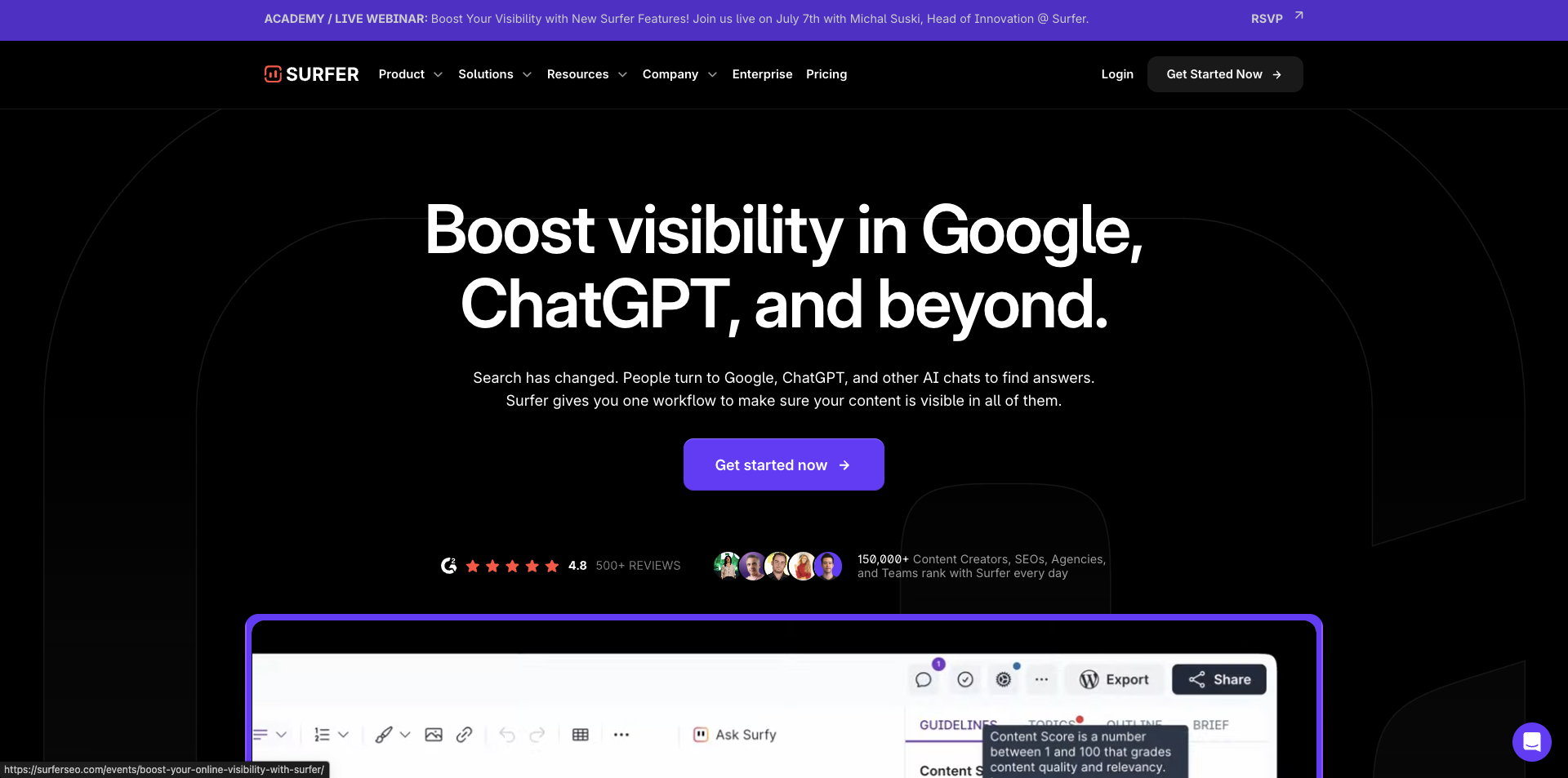
Having a solid text editor built into an AI content tool is essential and it of course delivers in that sense too. However, If you blindly follow every recommendation the tool provides, content can start to feel robotic or keyword-stuffed. The biggest issue though with Surfer SEO is entry-level Essential plan ($79/month billed annually) feels a little tight for solo creators or small content teams.
On paper, it looks decent:
- Optimize up to 30 articles per month
- Generate 5 AI-written articles per month
- Track 200 pages
- Access to keyword research, topical maps, and Surfer’s content editor
But compare that to tools like RightBlogger or Seio, which offer unlimited content generation, a lot more keyword research options, all for less than half the price, and you start to see the problem. If you’re primarily looking to generate new SEO Blog content, Surfer’s Essential plan is more of a light-touch optimizer than a full-scale content engine.
To really unlock the value (i.e., ramping up production, scaling across a team, using AI regularly), you’ll need to jump to the Scale plan at $175/month. It bumps your limits to:
- 100 article optimizations/mo
- 20 AI articles/mo
- 1,000 tracked pages
- 10 teammates
- Plus: 100 SERP analyses/day and onboarding support
For agencies or teams already building high volumes of content, Scale makes sense. But for smaller blogs or startups, Surfer’s pricing may push you toward using it as a supplementary optimization layer, rather than your primary content tool.
✅ When Surfer SEO Makes Sense:
- You’re optimizing blog content and want real-time, SEO-driven guidance
- You need to align articles with what’s actually ranking in Google and AI snapshots
- You’re working with a team and want consistent structure across writers
- You want built-in tools for AI writing, internal linking, and content quality checks
🚫 When It’s Not the Right Fit:
- You need an AI content generator to handle everything from scratch
- You don’t rely on SEO or SERP performance to drive traffic
- You’re looking for unlimited use without worrying about credits or tiered features
📊 Surfer SEO at a Glance
- Pricing: Starts at $99/month, More complex(and we think useful) AI features cost extra
- Primary Use: SEO content optimisation (not full content generation)
- AI Tools: Surfer AI, Outline Builder, AI Humaniser, Auto-Optimize
- Key Features: Content scoring, keyword clustering, SERP analyser, internal linking
- Ease of Use: Very intuitive — great for content writers, not just SEOs
- Best For: Agencies, content teams, or blogs focused on Google visibility
- Watch Out For: Add-ons can get expensive; SEO suggestions require judgment to avoid over-optimization
7) Jasper AI
Jasper AI (formerly Jarvis) was one of the first major AI writing tools to go mainstream, especially within the marketing world. Back before ChatGPT disrupted everything, Jasper built a loyal following among agencies, solopreneurs, and content teams. But in 2025, it feels like the platform is trying to do too much — and charging too much while doing it.
To be fair, Jasper has clearly invested in building a more robust product. It offers 50+ templates, an entire brand voice engine, a Surfer SEO integration, content repurposing tools, and a surprisingly well-thought-out campaign workflow system. In theory, it should be the ultimate AI assistant for marketing teams.
In practice, though, the results are mixed.
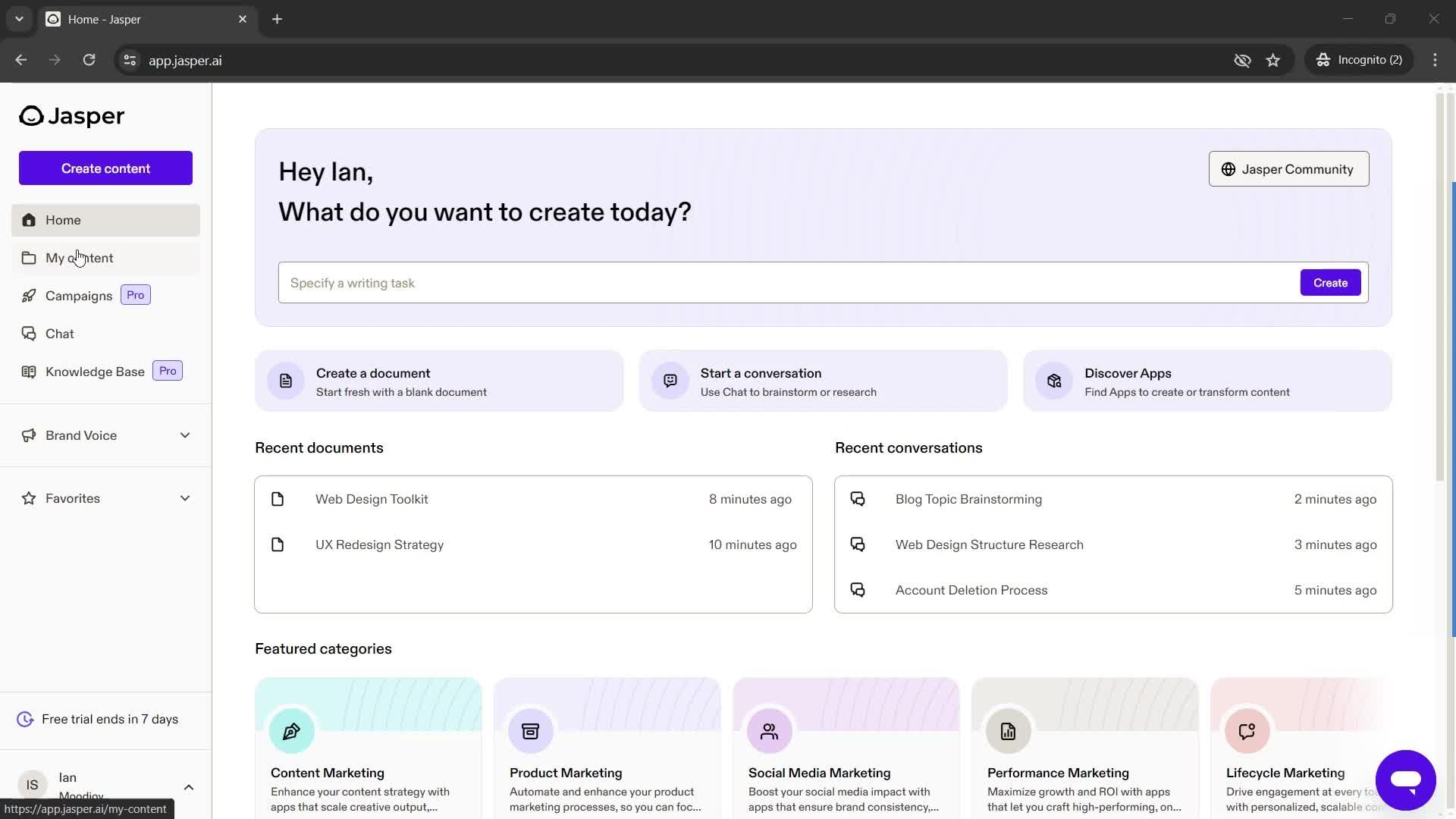
We found that while Jasper offers some genuinely useful features — particularly the prompt enhancement, chat, and LinkedIn post generator — the outputs often feel templated, and long-form content still requires heavy editing. The big sell is brand consistency, but even with voice training, we got results that felt cookie-cutter or formulaic.
Worse, the pricing is confusing. Some of the most useful features are locked behind higher-tier plans, and the platform doesn’t make that clear upfront. Several users report being charged without access to the features they expected — and refund requests are typically denied.
The idea of an AI assistant that writes on-brand content at scale is great. Jasper just doesn’t deliver on that promise consistently enough to justify the premium.
✅ When to Use Jasper:
- You’re a larger team with multiple clients or brand voices to manage
- You want template-based workflows for emails, blogs, ads, and social posts
- You need a centralized tool to manage AI-assisted content creation
- You’re already using SurferSEO and want seamless integration
🚫 When to Look Elsewhere:
- You need a reliable AI writer for blogs and don’t want to babysit the outputs
- You’re on a budget — pricing climbs quickly with useful features locked away
- You want flexibility and full control instead of pre-built templates
- You expect customer support to be responsive — it’s hit or miss
📊 Jasper AI at a Glance
- Pricing: Starts around $49/month — enterprise pricing climbs fast
- Main Focus: AI-powered marketing content at scale
- AI Tools: 50+ content templates, Brand Voice, Jasper Chat, Remix Mode
- SEO Features: SurferSEO integration (requires separate subscription)
- Ease of Use: Polished UI with helpful workflows — great for teams
- Best For: Agencies, large marketing teams, multi-brand environments
- Drawbacks: Inconsistent content quality, poor value at lower tiers, refund complaints
8) Copy.ai
Copy.ai has evolved from a simple AI copywriting tool into a full-fledged GTM (Go-to-Market) AI platform. From writing punchy headlines and marketing emails to powering enterprise workflows across sales, content, and operations — it promises to streamline go-to-market tasks and multiply productivity with minimal human input.
Its big selling points have to be a clean UI, loads of templates, and AI-powered workflows for sales, marketing, and localization, PERFECT for large teams that need to speed up a large volume of tasks. For quick emails, ad copy, or short social posts, it’s intuitive and fast. Its support for frameworks like AIDA and PAS is handy, and the tone-adjustment features are among the best in the game. But it’s a gamble: some outputs are spot-on, others are just strange (like love letters addressed to your husband when you asked for one for your wife).
The long-form output however often lacks the depth, structure, and clarity required for truly impactful content. You’ll get headlines and filler paragraphs — but rarely the kind of cohesive narrative or editorial polish that ranks well or reads with authority.
When Copy.ai Is Worth Trying:
- You want quick-win content like ads, social posts, or email intros
- You like the idea of a brand-safe content assistant with tone and voice controls
- You’re building out AI-powered GTM workflows across a marketing or sales team
- You want a slick UI that’s easy for non-writers to use
🚫 When to Be Cautious:
- You plan to use this for long-form blog content or SEO writing
- You value responsive customer support or clear billing practices
- You expect your content and settings to be backed up and recoverable
- You want accuracy and factual reliability without constant fact-checking
📊 Copy.ai at a Glance
- Pricing: Free plan with limits; Pro plan at $49/mo or $35/mo annually; Advanced team plans from $249/mo
- Main Focus: Short-form copy, GTM workflows, AI agents for sales + marketing teams
- AI Tools: 90+ templates, Blog Wizard (Beta), Brand Voice, Infobase, Tone Changer, Translation
- Standout Features: Agent workflows, “Explain Like I’m 5”, AIDA & PAS frameworks, easy link sharing
- Ease of Use: Extremely beginner-friendly — arguably the cleanest UI in the space
- Best For: Busy marketers, solo founders, and teams experimenting with AI-driven GTM content
- Drawbacks: Poor support, erratic output quality, glitchy platform updates, questionable billing
9) Anyword
Anyword is a data-driven content generation platform that aims to predict how your content will perform before you hit publish. For marketing teams who obsess over conversion rates and performance metrics, this pitch is compelling: AI that doesn’t just write, but writes with intent.
The platform uses what it calls “performance prediction” — a model trained on thousands of real-world marketing campaigns — to assign a score to every piece of content it generates. The idea is simple: stop guessing what will work and start creating content backed by actual data.
And for the most part, it delivers. Anyword excels at short-form, conversion-focused copy like ad headlines, email subject lines, product descriptions, and landing page text. Its persona targeting, brand voice support, and 1-click performance boosting tools make it feel more like a marketer’s assistant than a generic writing bot.
We have included it in the list because we feel it can be a great tool to use in combination with others to generate snippets of content that are data driven and therefore have a good chance of creating good outcomes for any use case you might have when generating blog content.
You can A/B test variants, compare new copy against past winners, and even run automated messaging tests across your site. For teams doing high-volume paid media or multi-channel campaigns, these tools are a huge win.
We found reports of multiple users report login issues, vanishing mobile features, or platform bugs — with slow or absent customer service responses. Some didn’t even receive a ticket confirmation after submitting urgent requests. We did not find any issues with it though and we rate this platform quite highly and would recommend that you give it a try.
✅ When Anyword Shines:
-
You’re running ad campaigns and need conversion-optimized headlines or copy
-
You want to test and score content ideas before publishing
-
You work in demand gen, paid media, or performance marketing
-
You like the idea of AI trained on your past campaigns, not just public internet data
🚫 When It Might Not Be the Right Fit:
-
You’re writing long-form blog content or SEO articles (tools are limited)
-
You’re a solo user who wants a full-featured plan under $100/month
-
You expect responsive, helpful customer support
-
You don’t need performance scoring or already use other tools for optimisation
📊 Anyword at a Glance
-
Pricing: Starts at $49/mo for individuals; $499/mo for business-grade features; Enterprise available on request
-
Core Focus: Performance-optimized ad copy, email, and landing page content
-
AI Features: Performance prediction, persona builder, SEO tools, brand voice, automated A/B testing
-
Standout Tools: Real-time performance scoring, campaign benchmarking, content personalisation
-
Ease of Use: Very intuitive — especially for performance marketers
-
Best For: Marketing teams, growth managers, and paid media pros
-
Drawbacks: High-tier pricing, inconsistent support, mobile app removed without notice
10) Jenni AI
Jenni AI markets itself as an intelligent research assistant for students, academics, and knowledge workers — essentially aiming to be Google Docs meets Zotero meets ChatGPT. With tools to help you write, cite, paraphrase, and summarize research, it’s become a popular choice for essays, literature reviews, personal statements, and thesis prep.
It’s got a beautiful user interface and it’s a platform that really love and appreciate. You can upload your own PDFs or import from Zotero or Mendeley to have Jenni cite and reference directly from them — even in one of 2,600+ citation styles. You can chat with papers, rewrite in your tone, and export to Word or LaTeX without much friction. It’s genuinely useful for academic workflows.
We love the autocomplete feature, combined with the ability to ask the AI to “expand,” “paraphrase,” or “summarize” text inline, helps reduce writer’s block, especially when juggling dense material. And for $30/month, it’s one of the more affordable unlimited-use options for research-heavy users.
If you are trying to create SEO blog content then Jenni AI is probably not for you but it you are trying to create more academic style content then look no further, its a great option and we would recommend it.
The only thing to look out for is that dozens of users report being charged for a year unexpectedly, without warning, and unable to cancel or get a refund, which is obviously annoying however, this was some time ago and the platform may have changed since.
✅ When Jenni AI Makes Sense:
-
You’re a student, researcher, or academic juggling citations, PDFs, and deadlines
-
You need a tool that writes, cites, and paraphrases in one workspace
-
You want a clean, focused interface with fewer distractions than ChatGPT
-
You’re producing content for papers, essays, blogs, or personal statements
🚫 When to Be Cautious:
-
You’re worried about unexpected charges or renewal fees
-
You want rock-solid platform reliability and responsive support
-
You need fact-checkable summaries — AI hallucinations still happen
-
You’re looking for a tool that goes beyond the ChatGPT wrapper feel
📊 Jenni AI at a Glance
-
Pricing: Free plan with limits; $30/month for unlimited use; Institutional plans available
-
Main Focus: Academic and research writing assistant
-
AI Tools: PDF-to-citation pipeline, autocomplete, AI chat, citation styling, paraphrasing, outline builder
-
Standout Features: Research-based generation, PDF import, in-text citation support, Word/LaTeX export
-
Ease of Use: Lightweight UI, focused on minimalism and academic utility
-
Best For: Students, researchers, essay writers, and anyone working in citation-heavy formats
How do I choose the right tool for my workflow?
Not all AI blog tools are built the same. Some focus on performance data and A/B-tested content (like Anyword), while others lean into academic structure, citations, and research-backed writing (like Jenni AI). Choosing the right one for your workflow comes down to a few core questions:
What’s the primary goal of your content?
If you’re focused on marketing outcomes — ad performance, click-through rates, conversion lift — then a performance-driven tool like Anyword is built for that.
But if your writing leans academic — think long-form essays, literature reviews, or research-backed blog posts — a structured assistant like Jenni AI may be a better fit. It excels at referencing sources, building outlines, and integrating citations with minimal friction.
Your first job is to identify what you need the content for, once you know this, you can look at the list above and pick one that meets your goals, obviously Seio is your first choice 😉.
How much control do you want over tone, voice, and branding?
If staying “on-brand” is critical, you need a lot more specific controls over the content output or you want to have more input that is used to influence what the tool generates then some of the earlier items on the list might be better for you.
Are you working solo or in a team?
If you are working in a team then your budget is more than likely a lot higher and some of the more expensive tools on the above list might be better suited to your needs as they tend to come with features that are geared towards content teams.
Its also worth considering integrations that the tools have and if you can integrate with your existing setup. Being able to automate processes such as converting content into social posts, automated scheduling and publishing can all be great additions as well as being able to connect to tools such as Zapier.
Can I publish AI content without editing it?
While every AI writing tool on this list brings something valuable to the table, it’s important to remember that AI-generated content is not perfect out of the box. Just like human writers, these tools can make factual errors, misinterpret tone, or miss the mark on nuance. Most tools today perform at the level of a junior to mid-level content writer — they’re great at producing a solid first draft, but they often need a human eye to refine, fact-check, and add polish.
Instead of spending hours staring at a blank page, you’re starting with a structured, often insightful draft that just needs some editing. Whether you’re using AI for ideation, outlines, blog posts, or academic writing, the key is to treat AI like an assistant that is there to help you produce high quality content outcomes faster.
Some tools(cough, cough, Seio) are getting better and are focused on optimising and getting the most out of the currently available AI infrastructure and processes that can be used to create the best content possible.
Bottom line, always edit your articles before publishing.
Final Thoughts: AI Blog Generators Are Your Competitive Edge — If You Use Them Right
The rise of AI-powered blog generation tools has fundamentally changed how content is created — making it faster, more scalable, and more accessible than ever before. Whether you’re a solo founder, a content marketer, or part of an SEO agency, the right tool can help you generate high-quality articles, target keywords more effectively, and ultimately rank higher in both Google and AI-powered search engines.
But remember: AI doesn’t replace strategy.
No matter how powerful the tool, your content still needs a human touch — to guide the tone, inject real insight, and ensure it aligns with your brand and goals. The best AI blog generators are those that enhance your workflow, not automate away your thinking.
If you’re ready to take your content production to the next level, start by understanding your needs, experimenting with a few tools, and finding the one that fits seamlessly into your workflow. (We humbly recommend giving Seio a spin — especially if SEO-focused blog content is your goal.)
Because in the end, AI is just the engine. You’re still the driver.
George Field
Founder & CEO at Seio
George is an entrepreneur with over 12 years of experience in digital marketing and SEO. He has successfully launched multiple businesses and created high-performing SEO campaigns. As the founder of Seio, George combines his deep understanding of search algorithms with cutting-edge AI technology to help businesses dominate their markets through strategic content creation.
Related Articles
Continue reading with these related posts

Discover how AI search is transforming SEO and learn the strategies you need to succeed in 2025 and beyond.
Most people think ranking #1 on Google is all about SEO—and while that's part of the puzzle, it's far from the full picture. In 2025, you need a complete strategy that goes beyond basic optimization.

For the past 17 years, I've helped generate hundreds of millions of visits from Google search. But for the first time ever, I'm questioning everything I know about SEO.